Customer support automation is often misunderstood as replacing human agents with chatbots.
That is too narrow.
The real purpose of automation is to redesign how customer interactions move through a service operation. Some questions can be answered immediately through automated workflows. Others require human judgment. The challenge is knowing where each approach delivers the best experience.
For businesses using customer service outsourcing services, automation can also change how external and internal teams work together. Instead of scaling support only by adding more agents, companies can use an automate customer service experience solution to reduce repetitive work and direct human attention toward interactions where it has greater value.
So, what is customer support automation, and where should businesses begin?
What Is Customer Support Automation?
Customer support automation uses technology to perform or assist with tasks that would otherwise require manual effort from a customer service agent.
This can include identifying the reason for a customer inquiry, retrieving relevant information, answering routine questions, directing requests to the correct workflow, and supporting agents during live conversations.
However, automation does not have to mean every customer receives a fully automated response.
A customer may begin with an automated interaction and later be transferred to a human agent. Automation can also work behind the scenes by helping agents access information or identify the next appropriate action.
This distinction is important.
The best automated customer service experience is not necessarily the one with the fewest human agents. It is the one that removes unnecessary effort while ensuring customers can still reach a person when the situation requires one.
Why Businesses Are Increasingly Automating Customer Support
The volume of customer interactions can grow much faster than support teams.
A business may receive thousands of similar questions about order status, account access, delivery, returns, or basic policies. Having agents manually process every one of these requests can consume a significant amount of operational capacity.
Automation can reduce that pressure by handling predictable parts of the workflow.
The benefit is not simply speed.
When repetitive tasks are managed consistently, human agents can spend more time resolving complicated cases, responding to emotionally sensitive situations, or addressing issues that require deeper investigation.
This becomes particularly valuable when support operations cover multiple channels and markets.
Where Should Customer Support Automation Start?
The first step should not be choosing an AI tool.
It should be understanding the customer journey.
Businesses should examine which questions occur repeatedly, where customers experience delays, and which processes create unnecessary work for agents.
For example, if a large percentage of inquiries involve information that customers can retrieve through a structured workflow, automation may be useful.
If a customer problem varies significantly from case to case and requires judgment, immediate automation may create more frustration than value.
The goal is to identify the right starting point rather than attempting to automate the entire customer service operation at once.
Start With Repetitive and Predictable Interactions
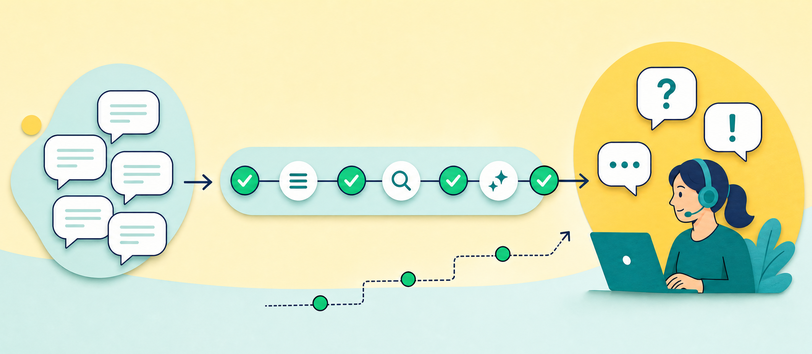
The best early automation opportunities are usually interactions with a relatively clear structure.
These may involve common questions, simple information requests, or routine processes with defined outcomes.
| Customer Support Task |
Automation Potential |
Why |
| Order Status Questions |
High |
Customers can often receive status information through a defined workflow. |
| FAQs & Basic Product Questions |
High |
Standardized information can be provided consistently without manual intervention. |
| Account & Password Assistance |
High |
Many common account issues follow predictable steps. |
| Return & Policy Questions |
Medium to High |
Clear policies can support automated responses and guided workflows. |
| Complex Complaints |
Low to Medium |
These cases may require investigation, judgment, or escalation to a human agent. |
| Sensitive Customer Issues |
Low |
Human involvement may be more appropriate when empathy, discretion, or judgment is required. |
The reason is not that these interactions are unimportant.
It is that they can often be standardized without requiring extensive human judgment.
Once these workflows are stable, businesses can gradually introduce automation into more complex parts of the operation.
This approach also provides useful data about how customers interact with automated systems and where they still require human assistance.
Build Human Handoffs Into the Experience
One of the biggest mistakes in customer support automation is creating a system that makes it difficult for customers to reach a human.
Automation should reduce friction, not create another obstacle.
A customer who has already explained a complicated problem to an automated system should not have to restart the conversation after reaching an agent.
The transition should preserve the relevant context so the human agent can continue solving the problem.
This is where automation and human support become complementary rather than competing approaches.
The system manages speed, consistency, and repetitive workflows. Human agents manage complexity, exceptions, and situations requiring empathy or judgment.
Nexlence describes its digital CX approach around AI agents, intelligent workflows, dynamic knowledge management, and collaboration between AI-powered capabilities and human expertise. Its X-Force platform also includes AI assistants for real-time support and automated quality and compliance checks.
Automation Depends on Good Knowledge
An automated system is only as useful as the information and processes behind it.
If policies are unclear or product information is outdated, automation can simply distribute incorrect information more efficiently.
Before implementing an automate customer service experience solution, businesses should therefore review the knowledge sources that support customer interactions.
The goal is to ensure that automated workflows and human agents are working from reliable and current information.
This is especially important when customer policies, products, promotions, or services change frequently.
Automation should be connected to an ongoing knowledge management process rather than treated as a one-time technology deployment.
Use Automation to Support Agents Too

Customer-facing automation receives the most attention, but some of the most valuable applications happen behind the scenes.
AI can assist agents by helping them identify customer intent, locate relevant information, or complete repetitive workflow steps.
This can improve efficiency without removing the human agent from the conversation.
For businesses with complex products or high customer volume, agent assistance may therefore be an important part of the automation strategy.
The customer still receives human support, but the agent has better access to information and operational assistance.
Related guide:Consumer Electronics Customer Support Outsourcing: How AI + Human Operations Improve Customer Experience
Measure Whether Automation Is Actually Improving the Experience

An automated workflow should not be considered successful simply because it reduces the number of conversations reaching human agents.
If customers repeatedly abandon the automated process and contact support through another channel, the workflow may be reducing agent workload while increasing customer frustration.
Businesses should therefore evaluate automation from both an operational and customer perspective.
Are routine issues being resolved effectively? Are customers reaching human support when necessary? Are agents receiving enough context after a handoff?
The answers to these questions are more meaningful than measuring automation volume alone.
How Automation Changes Customer Service Outsourcing
For companies using outsourced operations, automation can help create a more efficient division of work.
Routine interactions may be handled through automated workflows, while outsourced human teams focus on conversations requiring active problem-solving.
Automation can also support consistency by helping teams access relevant knowledge and follow established processes.
This creates a model where customer service outsourcing is not based purely on adding human capacity.
Instead, technology and human operations can be designed around the different types of work within the customer journey.
How to Get Started With Customer Support Automation
The best approach is usually gradual.
Start by identifying one operational problem with a clear pattern. Review the customer journey, understand the information required, build an appropriate workflow, and monitor what happens.
Then use the results to improve the process before expanding automation into additional areas.
This approach is generally more sustainable than trying to automate every interaction at the same time.
FAQ
What is customer support automation?
Customer support automation uses technology to manage or assist with repetitive customer service tasks, workflows, and interactions that would otherwise require manual effort.
Will customer support automation replace human agents?
Not necessarily. Many customer service operations use automation for routine tasks while human agents handle complex, sensitive, or judgment-based conversations.
What should I automate first in customer service?
Start with repetitive and predictable interactions where the workflow and required information are clearly defined.
How do I prevent automation from frustrating customers?
Ensure customers can move to human support when automation cannot effectively resolve their issue, and preserve relevant conversation context during the handoff.
Conclusion
Customer support automation is not about removing people from customer service.
It is about deciding where technology can reduce unnecessary work and where human expertise remains essential.
A strong automate customer service experience solution combines automation for speed and consistency with human support for complexity, judgment, and meaningful problem resolution.















 Nexlence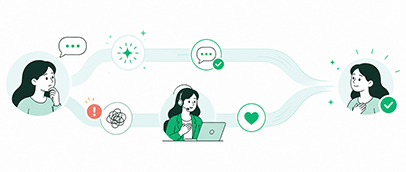





 PREVOUS ARTICLE